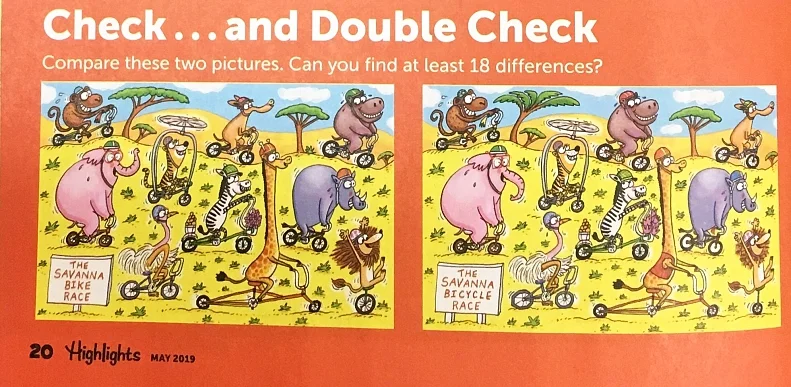
When I was a kid, the magazine “Highlights” was pretty popular. These were often seen in schools and in doctors offices. One of the best features was a “Spot the Difference” called “Check…And Double Check”. Essentially, there were two nearly identical illustrations placed side by side. Your job was to find all of the differences between the two illustrations.
Who knew that Highlights would prepare us for AI in the future? The “find the differences” skill, now between what should actually exist and what makes an AI image is a great skill to have.
Almost two hours long, but it’s Trevor Noah and Cory Doctorow. Lot’s of interesting conversation. Yes, there is discussion about enshittification. But there is also lots of discussion about how we got there and what is the impact of lots of the technology trends.
Repetitor really only makes sense if the repetition is truly spaced. That’s why you should activate the “save content state” on your platform which will enforce a waiting period in between rounds (that you define).
Well, and then you can tweak more things to your liking:
Don’t want student to jump backwards or peek ahead? You can change that.
You don’t like the content title, the page number or the round number in the top bar? Just deactivate them.
You like the predefined repetition modes, but have a good reason to limit the number of contents per round or the total number or rounds? No problem.
The students should not be able to retry an exercise in a round and/or not view the solution? Repetitor got you covered.
This seems like a truly awesome development. Spaced repetition is a powerful learning strategy. This allows for spaced repetition to be used just about anywhere.
Just as a reminder, one could set this up in Moodle and allow the students to create their own.
Looking for an overview of the Fediverse? Want to know what the Fediverse is?
Instead of using a social media site run by one company, the Fediverse is composed of lots of individual sites (Think email: a Gmail account can write to an Outlook one and nobody thinks twice. Same idea, just for posting and following.)
This is the fediverse: social media run by the people on it. Thousands of independent apps and communities that all talk to each other. Corporations can join the network. They can’t own it.
Whether it’s Google Slides, or other popular tools, anything with un-monitored chat or comment features is now a potential student attack vector.
Can your district supervise student use at the level you claim to parents, principals, and your board?
District question
Why it matters
Can students share designs with other students without teacher approval?
This creates a private communication path
Can students comment on shared designs?
Comments can become messaging
Can admins view, search, export, and retain comment history?
Investigations require records
Can controls differ by grade, campus, group, or device type?
Younger students may need stricter limits
Can Gen AI tools and apps be restricted by role?
Canva now includes many Gen AI-connected features
Do controls work the same on iPad app and browser?
Monitoring may differ by device
A Round Up of Quick Suggestions
Do Not Ignore the Image Search Issue. The suggestive image concern belongs in the same conversation. Even with content moderation, search systems are not perfect. Canva says its education collections are reviewed for school appropriateness. You still need to check permissions, settings, reporting options, and a child’s readiness before use. You may decide that older students can use Canva search with supervision. You may decide elementary students should use teacher-provided templates and assets only.
Consider another tool. You may decide that another tool is a better fit for younger grades. You are making community and age-appropriate access decisions.
Test alternatives. While there are alternatives to consider, be aware that they may not feel as smooth as Canva to teachers or students. Several educators will tell you it feels clunkier, or not worth the cost/effort to use. They may be right.
Questions to Ask Before Next Year
Before you decide, put these questions in front of Canva and your monitoring vendor:
Can district admins disable student-to-student commenting?
Can student sharing be limited to teachers, classes, or approved groups?
Can public links and Canva Sites be disabled for students?
Can admins search and export comment history?
Can app access be restricted by grade, role, group, or campus?
Can Gen AI tools be turned off for selected student groups?
Are image search protections different for Canva Education students?
Does monitoring work the same in the iPad app, Safari, Chrome, and managed browser environments?
What logs are retained, for how long, and who can access them?
What happens when a student reports content or behavior?
This is a wonderful write up with great, specific action points.